4 PROTOCOLS · ONE PHOENIX·MULTI-GIG NETWORK·SPLIT TUNNELING BY COUNTRY
GET STARTED →

Your internet
On your terms

Four modern protocols, traffic masking and powerful dedicated servers. Phoenix puts you in control of your connection: a protected tunnel for some tasks, a direct route for the countries you choose.

ENCRYPTION·MASKING·YOUR ROUTING RULES
●Windows & Android now · iOS soon
7 days free · 30-day money-back
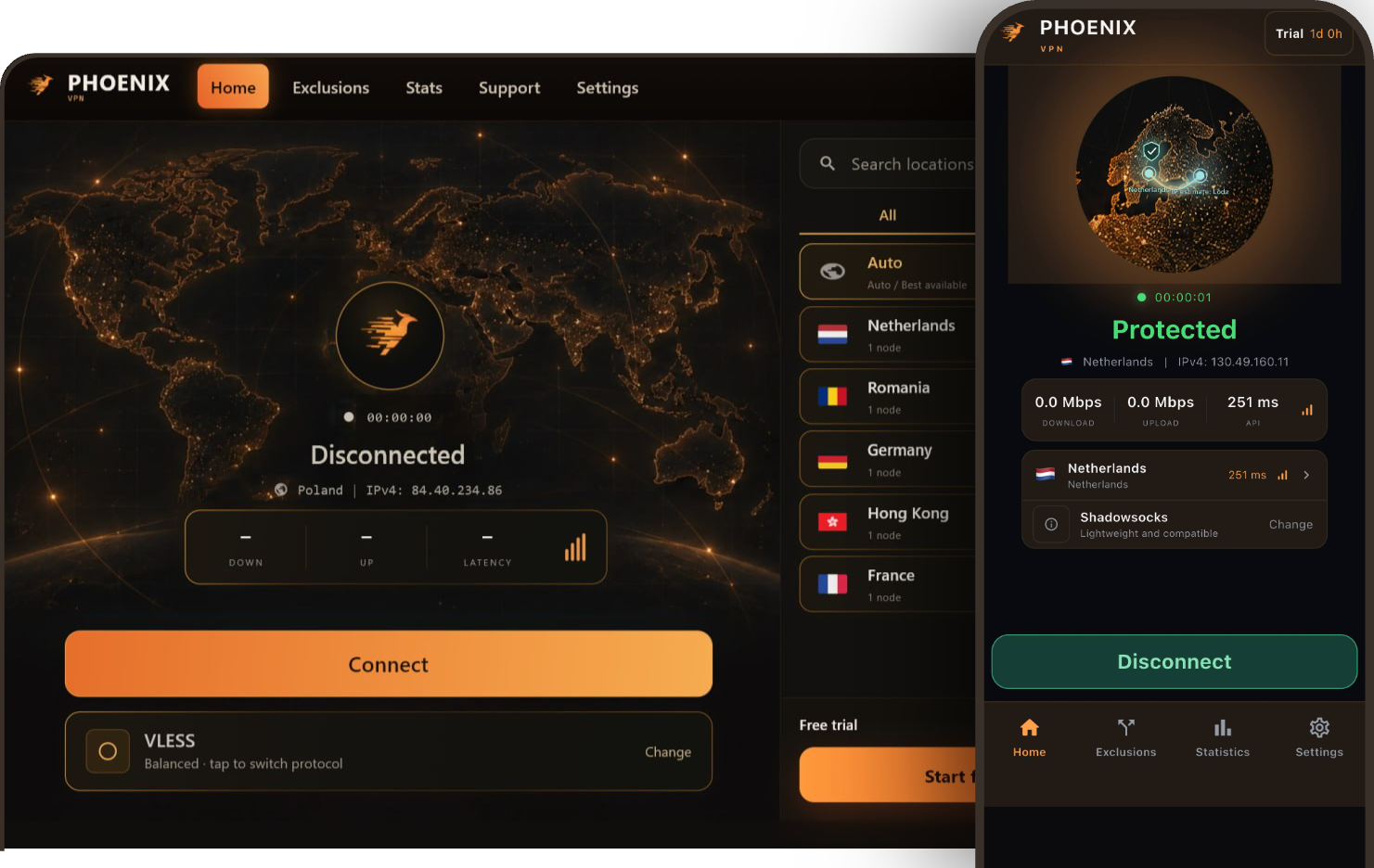
Phoenix VPN desktop and mobile apps
VLESS + REALITY
HYSTERIA2
SHADOWSOCKS
WIREGUARD
4 protocols
Different ways to connect
Multi-Gig
Multi-gigabit network links
Own apps
Windows now · more platforms soon
No history
We don't store sites you visit
// Why Phoenix

More than a button
A whole approach

Several answers for difficult networks

One way of connecting is restricted? Try another. Different masking technologies give you more ways to stay connected.

A VPN you don't keep toggling

Banks and local services go direct, by rules you choose. No need to switch the whole tunnel off for everything else.

CHOOSE YOUR ROUTES →

Real resources behind the button

Every connection is backed by dedicated servers and multi-gigabit links — not just a nice app interface.

Privacy without vague words

We explain what we don't store, how partitions on our nodes are protected, and what checks really show.

READ THE DETAILS →
// 01 — DPI resilience

Not just encryption
Traffic masking

DPI — deep packet inspection — analyses network packets in depth. Such systems can recognise typical VPN signatures and restrict connections. Phoenix offers several approaches that make traffic harder to recognise.

TWO JOBS. ONE APPROACH TO PROTECTION.
Encryption protects the content. Masking changes the outward signs of the connection.

You don't have to rely on a single option: when a network restricts one way of connecting, you can try another — without leaving Phoenix.

01 / TLS

VLESS + REALITY

Closer to ordinary TLS traffic

REALITY borrows the look of a TLS connection to a regular website as its disguise. This reduces the typical signs of a protected proxy and makes it harder to recognise.

HOW REALITY WORKS →
02 / AEAD

Shadowsocks

An encrypted stream instead of open commands

With AEAD ciphers, both the data and the proxy's control fields are protected. This makes recognition by fixed signatures in the stream harder — without imitating ordinary HTTPS.

MORE ON SHADOWSOCKS →
03 / QUIC

Hysteria2

Performance, with a choice of masking

By default the protocol imitates HTTP/3. With Salamander enabled, packets look like random data. These are separate masking modes; which one is used depends on configuration.

MORE ON HYSTERIA2 →
// 02 — Strength in choice

Different networks
Not one answer

It's not only about speed — it's how the connection behaves on your network. Choose between different transports and masking approaches, all inside one service.

VLESS + REALITY / TLS MASKING

A protected transport
A less recognisable profile

VLESS paired with REALITY is the option for networks where resistance to recognition matters. REALITY takes on the appearance of a TLS connection to a regular website and helps reduce the typical signs of a protected proxy. Instead of an easily recognised separate protocol, you get a connection that aims to look like familiar secure web traffic.

In Phoenix, it's one more way to match your connection to network conditions — without switching services.

These properties apply to the VLESS + REALITY combination, not to every VLESS variant. Results depend on settings and filtering methods; masking does not hide your exit IP from websites.

✦ Looks like TLS
REALITY brings the outward signs of the connection closer to ordinary secure web traffic.
✦ Fewer signs under inspection
The REALITY mechanism is also designed to make active probing of the server harder.
✦ An alternative for difficult networks
Try a different way of connecting when a typical VPN gets restricted.
QUIC / UDP / MASKING MODES

Speed for difficult networks
Flexible masking

Hysteria2 uses QUIC and its own congestion control with a focus on performance. It's worth trying when you see packet loss or an unstable route and a regular connection isn't delivering.

The protocol also supports masking: by default it imitates HTTP/3, and with Salamander enabled it turns packets into outwardly random data, changing the recognisable signs of QUIC.

HTTP/3 and Salamander are separate modes, not two kinds of masking running at once. Availability depends on server and client configuration. These modes require UDP to be available.

✦ Built for performance
An alternative approach to data transfer for less-than-ideal networks.
✦ HTTP/3 or Salamander
Different ways to change how the connection looks — depending on configuration.
✦ Another transport, same app
Try QUIC when another protocol doesn't suit your network.
SHADOWSOCKS / AEAD

Fewer visible signs
More connection flexibility

Shadowsocks is a lightweight encrypted proxy transport. With AEAD ciphers, not only the payload but also the proxy's control fields are protected. This makes simple recognition by fixed signatures in the stream harder, while providing confidentiality and integrity checks for your data.

The Shadowsocks 2022 specification adds further measures against active probing of the server. Whether they're present depends on the version and implementation.

Shadowsocks on its own does not imitate HTTPS and does not rule out recognition by traffic behaviour. Which device traffic is covered depends on the app's mode and settings.

✦ No open proxy commands
Control fields are encrypted, not sent in plain text.
✦ Lightweight, with AEAD
A practical transport that protects data confidentiality and integrity.
✦ Independent of TLS
Another option when imitating web traffic isn't the best fit.
UDP / CHACHA20-POLY1305

Less overhead
More focus on speed

WireGuard combines a compact design, modern cryptography and high efficiency. A good starting point for everyday work, video calls, gaming and large downloads. Fewer moving parts in the protocol means more resources for the connection itself.

Low latency depends on the route, distance to the server and network quality. Standard WireGuard isn't designed to mask traffic from DPI — Phoenix has other approaches for that.

✦ Efficient by design
Low overhead and a lean architecture.
✦ Modern cryptography
ChaCha20-Poly1305 to protect traffic, with a well-designed key exchange.
✦ An easy place to start
Try it first on a stable home or office connection.
AmneziaWGPLANNED

We plan to add this evolution of WireGuard with altered outward traffic signatures — one more approach to a flexible, protected connection.

Our own protocolPLANNED

The next stage is in-house development. Our goal: build around what Phoenix users actually need, not add technology for the sake of a new name.

// 03 — Country exclusions

Don't switch the VPN off
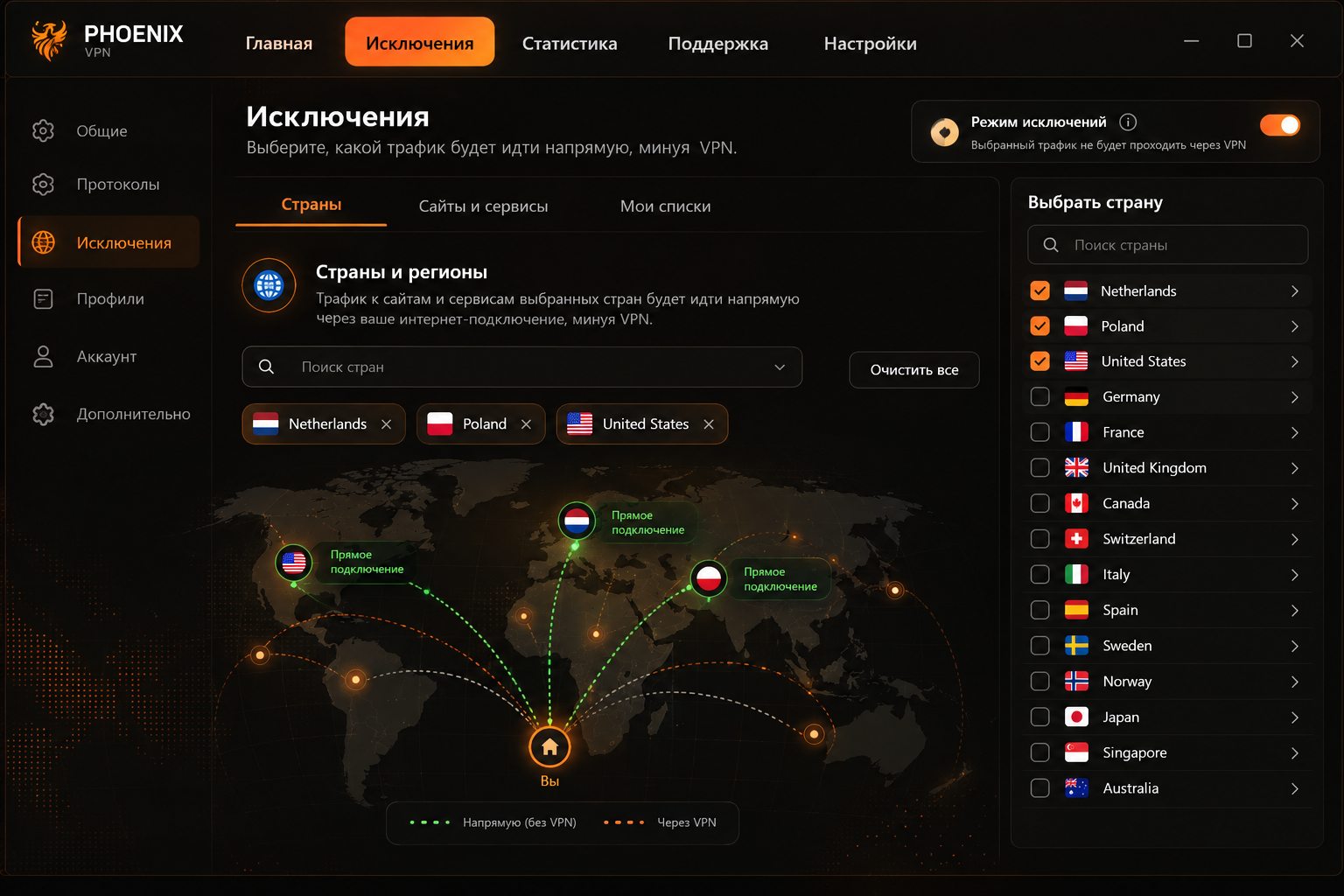
Set up exclusions

Banks, government portals and local services can run over your regular connection. Add the countries you need to exclusions — and keep the VPN on for everything else.

PHOENIX / EXCLUSIONS⤢ ENLARGE
Phoenix VPN exclusions mode: choosing countries for a direct connection outside the VPN tunnel
Pick countries in the app. The image shows an example setup, not a live connection.
◍ ANY COUNTRY IN THE WORLD

One setting
Two traffic paths

Choose one or more countries. Connections that match your exclusion rules go direct — bypassing the VPN server.

YOU
Direct
Matches exclusions · your ISP, no VPN
YOU
Through Phoenix
All other traffic · inside the tunnel

You control not only how you connect, but also what goes through the tunnel.

01 / EVERYDAY FINANCES

Banks and payments

When your bank needs a non-VPN connection, send that traffic through your own provider — without turning the tunnel off for anything else.

02 / E-SERVICES

Government portals

Personal accounts, appointment booking and local e-services go direct, if their connections fall under your chosen rules.

03 / YOUR RULES

Any country in the world

Not just the country you live in. Pick any countries from the full list and adjust exclusions to your daily tasks.

A direct connection is outside VPN protection. Phoenix encryption and masking don't apply to excluded traffic: websites see the external IP of your regular connection. HTTPS still protects your connection to the site.

Excluding a country affects all traffic matching its rules, not just banks. A service's country and where its servers are hosted can differ; results depend on addresses and the lists used. Availability depends on platform and app version.

// 04 — Infrastructure

Speed is architecture
Not a number on a banner

Dedicated servers and multi-gigabit links are the foundation of Phoenix. You don't just get an address to connect to — you get access to infrastructure that runs several secure data-transfer technologies.

✦Powerful dedicated servers. Server resources built for running a VPN service.
✦Multi-gigabit links. The basis for many connections running at once.
✦Several ways to move data. Pick a protocol for the task instead of changing services.

Server link capacity is not your personal speed. Results depend on your provider, device, route, load and the protocol you choose.

Multi-Gig
PHOENIX VPN NODE
PX / 01
PX / 02
PX / 03
PX / 04
SCHEMATIC · DEDICATED INFRASTRUCTURE
// 05 — Privacy & protection

Your history is
not our database

Protecting the connection and protecting data on the server are different jobs. Both matter — and it matters to describe them precisely.

NO ACTIVITY LOGS

The connection runs
History doesn't pile up

We don't turn your internet activity into a service archive. Phoenix VPN nodes do not store:

$ phoenix node --stored
✓ browsing history ······· not stored
✓ dns query logs ········ not stored
✓ traffic content ······· not stored
An account is not a browsing history.
Account and subscription data is needed to provide access. It's a separate category of data, not a list of sites you've opened.

No activity logs doesn't mean no technical connection data at all. The scope of service data and retention periods are set out in our Privacy Policy.

ENCRYPTED STORAGE

Protection doesn't end
at the VPN tunnel

Partitions on our VPN nodes are encrypted. That's extra protection for data on the drives — including if someone gains physical access to the disks or a powered-off server.

A7 9F 2B D8 61 0E C4 93
F1 48 BC 07 3A E9 55 D0

Reading the contents of protected partitions requires the keys. This works when configured correctly and as long as the keys don't fall into someone's hands along with the hardware.

Disk encryption doesn't cover every scenario: on a running server, partitions may already be unlocked. Today Phoenix uses encrypted partitions, not RAM-only servers.

◆

We protect the path to the VPN server. Traffic sent through the protected tunnel is encrypted between your device and the Phoenix server. HTTPS additionally protects the connection to the final website. A VPN doesn't replace the security of the device or the site itself.

// 06 — Not just promises

Privacy is also
in the details

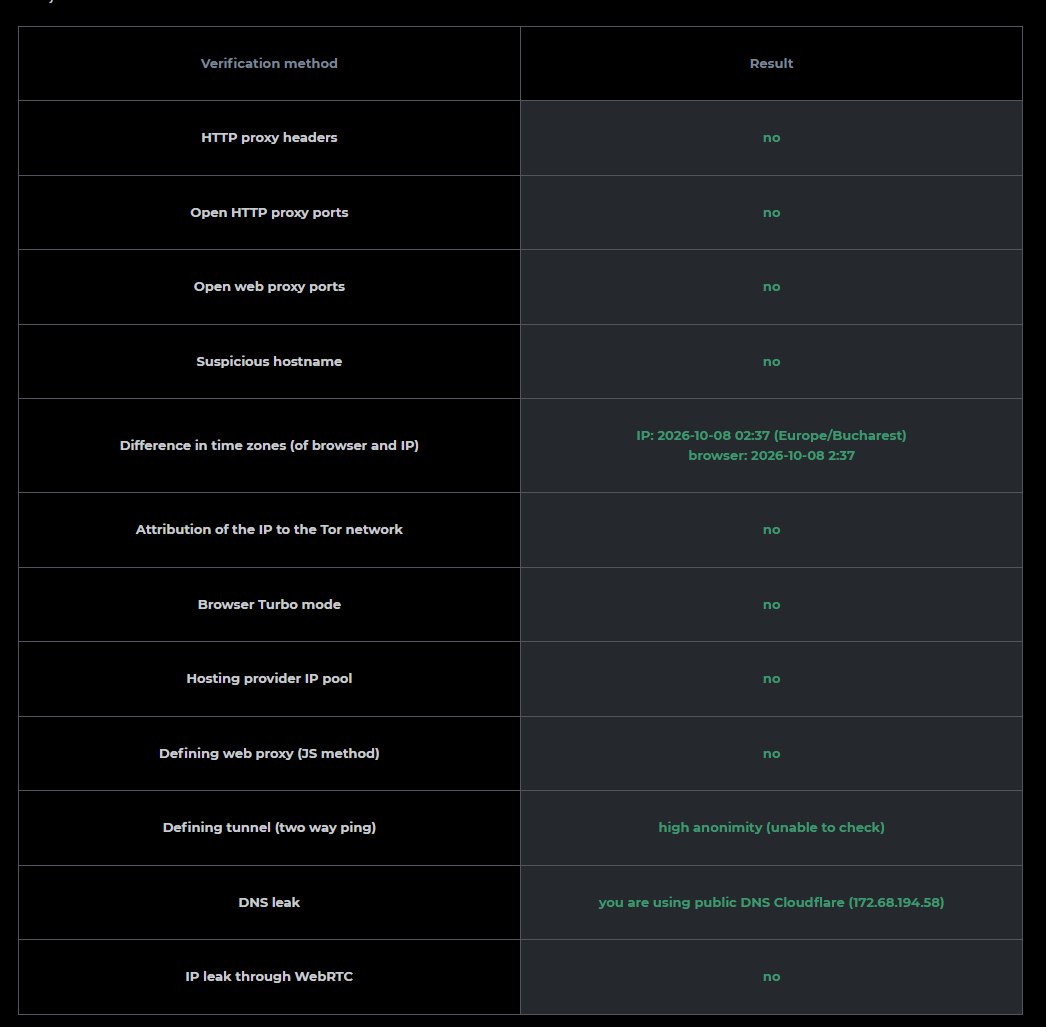
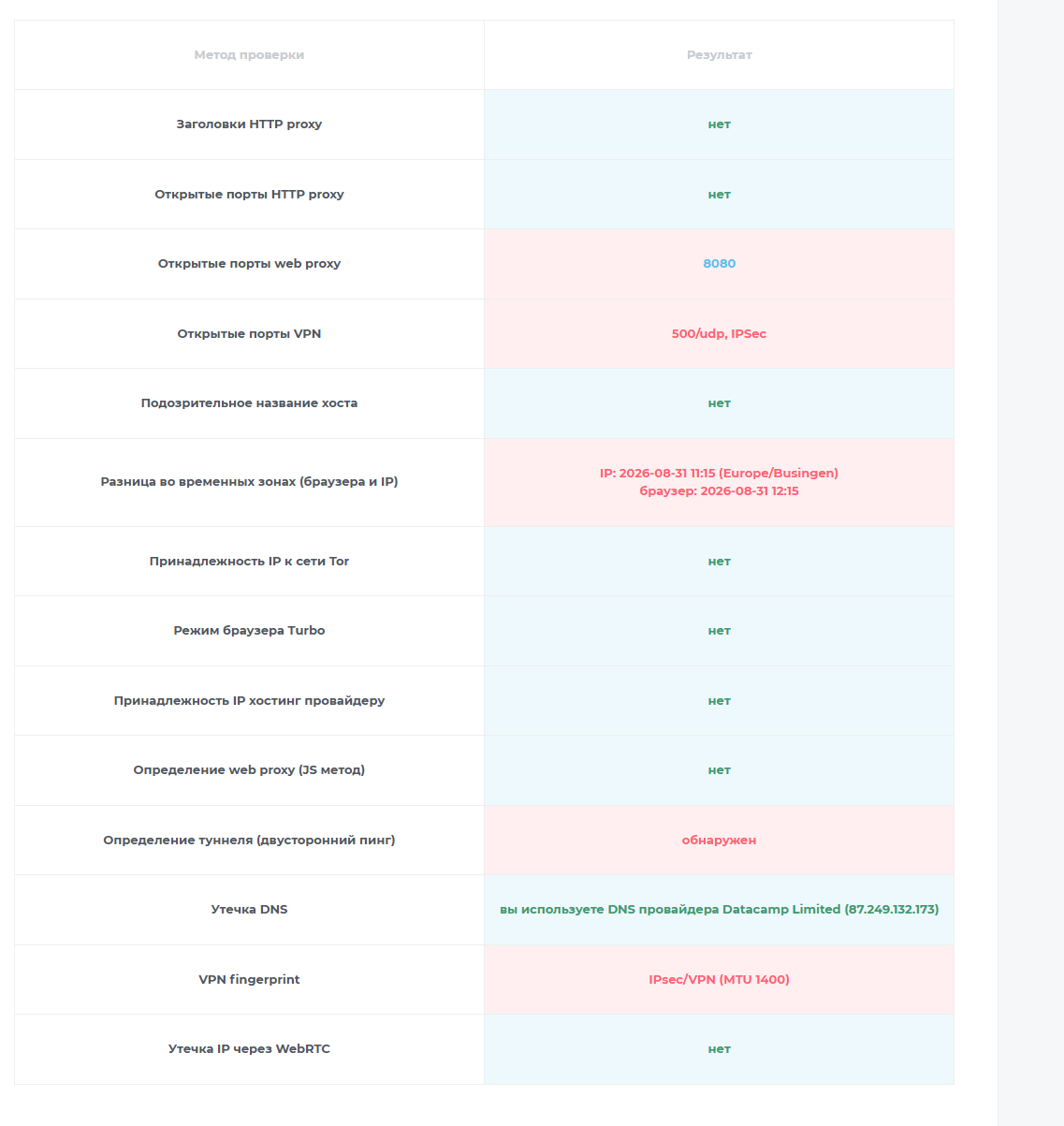
In the check provided, Phoenix showed no proxy headers, no open web-proxy ports and no IP leak via WebRTC. See the specific results and the original snapshots.

CHECK
Phoenix VPN
Another VPN
HTTP proxy headers
Not detected
Not detected
Open web proxy ports
Not detected
8080
IP belongs to a hosting provider
Not flagged
Not flagged
IP leak via WebRTC
Not detected
Not detected
Tunnel detection
Unable to check¹
Detected
Open VPN ports
Row not shown²
500/udp, IPSec
VPN fingerprint
Row not shown²
IPsec/VPN (MTU 1400)
DNS resolver
Cloudflare
Datacamp Limited

¹ "Unable to check" is not proof of invisibility. The original Phoenix result reads "high anonymity (unable to check)". It's an inconclusive result, not confirmation that no tunnel exists.

² No row, no conclusion. The Phoenix snapshot doesn't show the VPN fingerprint or open VPN ports rows. From this image they can't be called "not detected".

An IP check is not a DPI test. These snapshots show signs of the IP address, ports and browser connection. They don't confirm that a provider's DPI system can't recognise the traffic — masking technologies solve a separate problem.

Original Phoenix check snapshot
Phoenix VPN
ORIGINAL SNAPSHOT
⤢ ENLARGE
Original snapshot of another VPN
Another VPN
COMPARISON SNAPSHOT
⤢ ENLARGE

This illustrates a specific check — it is not an independent audit and not a guarantee of anonymity. A DNS provider's name alone doesn't prove or rule out a DNS leak: query routing and client settings matter.

// Plans

Simple plans
Full protection

Every plan includes all four protocols, country exclusions, the same transparent privacy policy, and a 7-day free trial. Cancel anytime.

Intro pricing for your first term. Subscriptions auto-renew at the standard rate — you can cancel renewal anytime in your account, in one click. Prices in EUR; VAT or sales tax is calculated at checkout. 30-day refund policy.
EMBER

For one person, up to 3 devices.

€3.67/mo
billed €87.99 for the first 2 years
✦ 3 devices
✦ Unlimited traffic
✦ All 4 protocols
✦ Country exclusions
✦ No activity logs
MOST POPULAR
PHOENIX

For everyday life.

€5.00/mo
billed €119.99 for the first 2 years
✦ 6 devices
✦ Unlimited traffic
✦ Everything in Ember
✦ Multi-gig network links
✦ Windows & Android apps; iOS planned
✦ Support access
INFERNO

For families and power users.

€5.92/mo
billed €141.99 for the first 2 years
✦ 10 devices
✦ Unlimited traffic
✦ Everything in Phoenix
✦ Country exclusions
✦ No activity logs
// 07 — Phoenix on your devices

Our own apps
One approach

Phoenix is more than a server and a config file. We build our own clients so that complex technology becomes part of a clear, simple service.

Windows
OWN CLIENT
Download
Android
GOOGLE PLAY
Get it on Google Play
iOS
COMING SOON
Coming soon
macOS
COMING SOON
Linux
PLANNED

Windows and Android are available now. iOS and macOS are coming next; Linux is planned. Protocols, masking modes and country exclusions depend on platform and app version.

// 08 — Straight talk

A strong service
Direct answers

We don't promise the impossible. We explain what you get, what the result depends on, and where protection ends.

Which protocol should I try first?+

On a stable network, start with WireGuard. When resistance to recognition matters, try VLESS + REALITY; Shadowsocks offers a different approach with an encrypted proxy stream, and Hysteria2 combines QUIC with the masking modes available in its configuration. There's no universal winner: results depend on the network, device, server and app version.

What is anti-DPI and why does it matter?+

DPI is deep packet inspection. It can use outward traffic signs to recognise and restrict VPNs without decrypting their content. Anti-DPI is the general name for approaches that make such recognition harder — for example, disguising a connection as TLS or changing recognisable packet signatures. It's not a separate "fifth protocol" and not a guarantee of working under every restriction.

Can I open my bank and keep the VPN on?+

Yes. Turn on exclusions and choose the countries you need. Connections that match those rules go direct; the rest of the traffic covered by the VPN stays in the active tunnel. What gets excluded isn't "the bank" as such, but traffic matching your chosen rules. If a service uses infrastructure in several countries, one rule may not cover all its connections. We can't guarantee any particular bank or portal will work.

Does excluding a country give me an IP from that country?+

No. It chooses a direct route; it doesn't issue a new IP. Websites see the external address of your current internet connection. When travelling, that won't necessarily be an address in your home country. If a service requires a connection from a specific country, an exclusion alone doesn't meet that requirement.

What happens to the protection of excluded traffic?+

It travels outside the Phoenix tunnel: VPN encryption, the VPN IP and protocol masking don't apply to it. The site's own HTTPS encryption still applies. Only add the exclusions you need: a country rule covers all matching traffic, not just banks and government services. Anti-DPI for the VPN connection doesn't protect the direct route.

What exactly does "no activity logs" mean?+

We don't store the history of sites you visit, DNS query logs or the content of your traffic. The service does need account, subscription and service data. No activity logs doesn't mean no technical connection data at all. Its scope, purposes and retention periods are set out in our current Privacy Policy.

Is Phoenix impossible to identify as a VPN?+

No — we don't promise total invisibility. Traffic masking makes the connection harder to recognise on the network, while websites can separately assess the exit IP, cookies, your account and browser fingerprint. The snapshots shown are results of specific connections, not proof of being unrecognisable to DPI. Even with masking, a connection can be restricted by IP address or other network signs.

Does partition encryption protect if a server is stolen?+

It protects data on the drive from being read without the keys, but conditions matter: correct configuration, the unlock method and key safety. Theft of a powered-off device or disk and seizure of a running server with partitions already unlocked are different scenarios. So disk encryption doesn't make all data invulnerable. Today Phoenix uses encrypted partitions, not RAM-only servers.

Is a multi-gig network my guaranteed speed?+

No. It describes the links in our infrastructure, not the personal speed of each connection. The result depends on your ISP plan, device, Wi-Fi or mobile network, distance to the server, load and the protocol you choose. We invest in server resources and transport choice rather than promising the same speed in every condition.

What's available now, and what's coming later?+

Phoenix currently offers Windows and Android apps. iOS and macOS are coming next; Linux, AmneziaWG and our own protocol are planned. Protocol and exclusion availability depends on platform and app version.

Can I cancel anytime?+

Yes. Subscriptions auto-renew, and you can switch renewal off in your account at any moment, in one click. The 7-day trial is free, and every plan has a 30-day refund policy.

TECHNICAL SOURCES & NOTES+

Technology descriptions are based on developer documentation and specialist technical sources. They explain the properties of the protocols, split routing and HTTPS, but are not an audit of Phoenix, confirmation of each server's configuration or a guarantee that any specific site will work. Mentioning MaxMind doesn't mean Phoenix uses that particular database.

1 · Project X: REALITY transport & TLS masking 2 · Hysteria2: protocol specification 3 · Shadowsocks: AEAD ciphers 4 · WireGuard: architecture & cryptography 5 · Amnezia: AmneziaWG documentation 6 · Cryptsetup: disk encryption security model 7 · BrowserLeaks: what the DNS leak test checks 8 · Hysteria2: HTTP/3 & Salamander obfuscation 9 · Shadowsocks 2022: anti-probing measures 10 · WireGuard: known limitations & DPI 11 · XTLS / REALITY: server behaviour & masking model 12 · Microsoft Learn: split tunneling & VPN 13 · MaxMind: limits of IP-based geolocation 14 · MDN: HTTPS & site connection security

Check snapshots and the interface illustration were provided for this page; image contents are unaltered. Third-party protocol and product names belong to their owners; their use does not imply an official partnership.
More questions

What is a VPN, actually?+

A VPN — virtual private network — creates an encrypted tunnel between your device and the internet. Everything you send is encrypted before it leaves your machine, so it can't be read or altered in transit — on public Wi-Fi, on a hotel network, anywhere.

What data do you process?+

The minimum necessary to run the service: account and billing details, plus technical data for abuse prevention. Full details are in our Privacy Policy — written to be readable, and GDPR-compliant.

Is using a VPN legal?+

In most of the world, yes — the US, UK, EU and most other countries are fine with it, as long as what you do through it is legal too. A few states restrict VPN use; it's your responsibility to know the laws where you are.

What affects VPN speed?+

Four things, mostly: how far away the server is, how heavy the encryption is, how crowded the server is, and your own base connection. Phoenix answers the first three — 90+ countries so one is always nearby, a lightweight modern protocol that barely taxes the line, and load-balancing that never overfills a box. The fourth one is on your ISP.

Why pay for a VPN when free ones exist?+

A free VPN still has bills — and it pays them with you: injected ads, browsing profiles sold on, sometimes your bandwidth rented out to strangers. Phoenix has exactly one source of income: subscriptions. If we are not worth it, the first 7 days are free and the first 30 come with a full refund.

Which platforms can I use today?+

Phoenix for Windows (10 & 11) is live today. Android, iOS, and macOS are coming next — and your plan will cover all of them from day one.